Saree Photoshoot for Online Selling: Step-by-Step Guide
A saree photoshoot workflow for online selling: how to shoot body, pallu and blouse, turn flat lays into on-model photos, and build the full listing set.
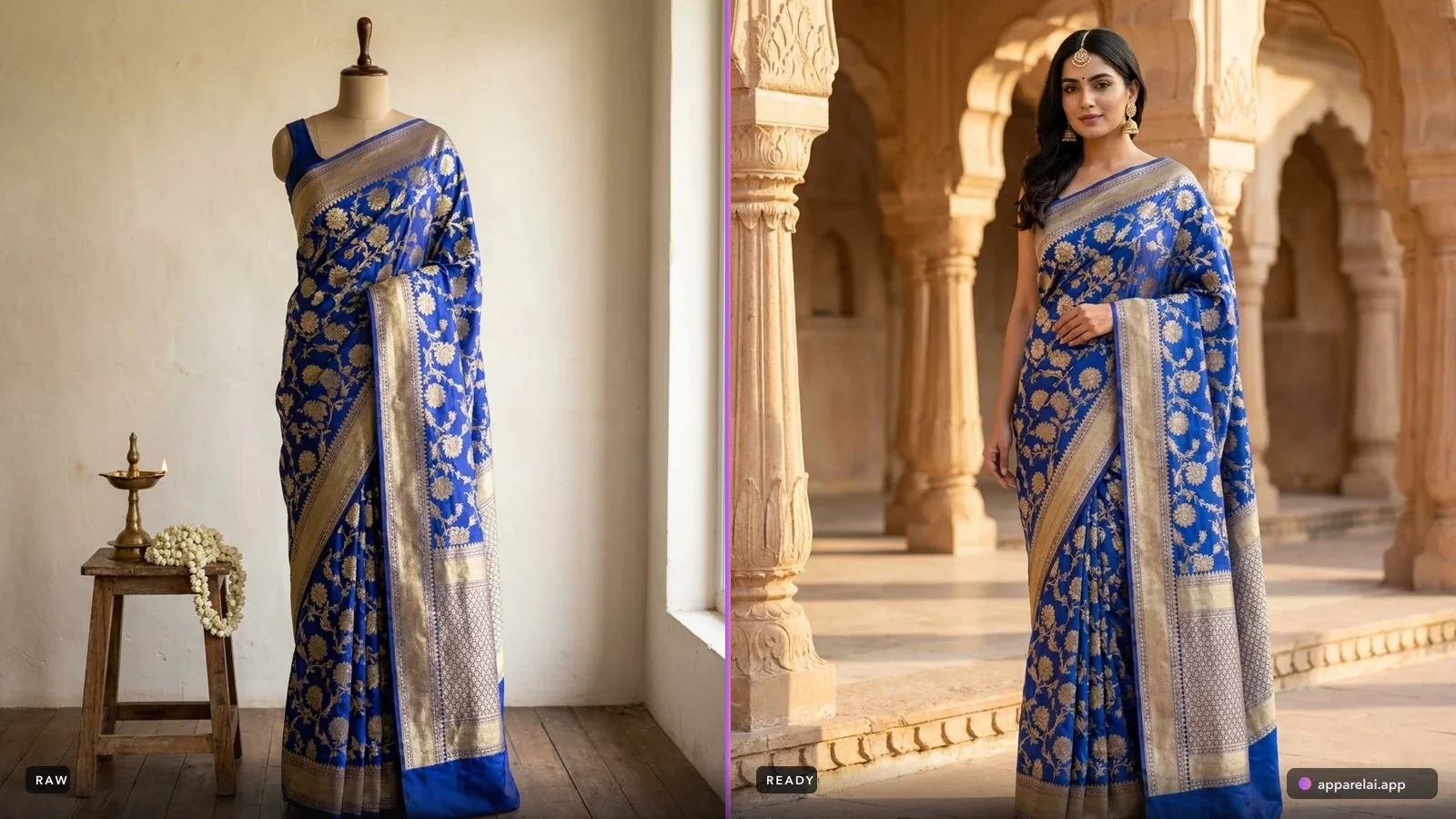
A saree photoshoot for online selling starts the same way for almost everyone: a stack of folded sarees in polybags, a phone, and a listing deadline.
Between that and a set of on-model listing photos there is a process. Skip steps in it and you get AI output with an invented pallu, a blouse in the wrong colour, or a border that stops halfway. Follow it and you get listing-ready images in minutes per saree. Here is the whole thing, in order.
Why sarees need their own workflow
Every other garment is one continuous surface. A kurti is a kurti. Photograph it flat, generate it on a model, done.
A saree is not one surface. It is five and a half to nine yards of fabric with at least three visually distinct zones that a buyer inspects separately:
- •The body, which carries the main colour, weave and print
- •The pallu, the decorative end that falls over the shoulder and is usually the most ornate part of the garment
- •The blouse piece, often a contrasting or matching fabric attached to the saree
Those three do not look alike, they do not sit next to each other in the final drape, and the buyer scrutinises each one. That single fact drives everything below.
Step 1: Get the body fabric shot right
This is the input everything else depends on, so it deserves the most care.
Lay it flat and lay it fully. Fold the saree so a meaningful stretch of the body is visible along with at least one full run of the border. If the border is cropped out of your source photo, the AI has nothing to reproduce it from.
Kill the creases. Steam or press before shooting. Fold lines read as drape folds to an AI model, and they come back as strange shadows in the generated image. This is the single most common cause of bad saree output.
Light it evenly. Diffused daylight near a window, or two soft lights at 45 degrees. Avoid direct flash, which blows out zari and flattens weave texture.
Shoot square on. Camera parallel to the fabric, not at an angle. Angled shots distort the pattern repeat and the AI reproduces the distortion.
Check your colour. Silk in particular photographs differently than it looks. Set white balance against a white sheet of paper before you start. A maroon that uploads as brown will come back as brown, and "not as pictured" is the most expensive return reason in this category.
Step 2: Photograph the pallu and blouse separately
This is the step most sellers skip, and it is the one that separates acceptable output from accurate output.
Pallu: shoot it as its own frame, flat and evenly lit, with the full motif visible. On a Kanjeevaram or Banarasi this is where the temple border, the zari work and the pattern density live. It is also the part of the saree that ends up over the shoulder in the final image, at the exact eye level a buyer looks at first.
Blouse piece: shoot it flat and separately. Blouse colour is a frequent mismatch in AI saree output when the model has to infer it, because an unstitched blouse piece folded into the saree looks like more body fabric.
You are not creating extra work for its own sake. You are removing the two things the AI would otherwise have to guess.
Step 3: Use Saree Mode with the Advanced Saree Engine
Standard AI photoshoot flows take one image of a garment. For sarees that is not enough information, which is why we built a saree-specific flow that accepts the parts separately:
- •Saree Body (required): the main fabric
- •Pallu: the decorative end piece
- •Blouse: the blouse piece
Upload the body on its own and you get a good generic result. Add the pallu and blouse and the output stops guessing: the drape carries your actual pallu motif over the shoulder, and the blouse renders in the fabric you actually ship. Border close-ups help too, particularly on heavy woven sarees where the border is a selling point in its own right.
The rule of thumb: the more visually distinct your saree's parts are from each other, the more the separate inputs matter. A plain cotton saree with a thin matching border does fine on the body image alone. A silk saree with a contrast pallu and a different blouse piece needs all three.
Step 4: Set drape, model and background
Drape style. Nivi is the safe default and what most Indian marketplaces expect. Choose Bengali for Tant and Jamdani, Gujarati if your customer base expects a front-facing pallu. The drape changes which part of the saree is visible, so pick it based on what you most want the buyer to see.
Model. If you sell a range, use the same persistent model across the catalog. A saree catalog where every listing features a different face reads as a reseller; the same face across 200 listings reads as a brand.
Background. Marketplace listings want plain and light. Save lifestyle backdrops for your gallery images and social content.
Step 5: Review before you publish
AI output for sarees needs a real check. Run this list on every image:
- Border continuity. Does the border run unbroken along the edge, or does it break or change pattern mid-run?
- Pallu placement and motif. Is the pallu the one you uploaded, and is it falling correctly over the shoulder?
- Blouse match. Correct colour, correct fabric, sleeves and neckline plausible?
- Pleats. Do the front pleats look folded rather than printed on?
- Hands and fingers. The usual AI weak point, and hands often sit near the pallu in a saree pose.
- Colour against the original. Open your flat lay side by side with the output.
Anything that fails, regenerate. The cost of a regeneration is a credit. The cost of a wrong listing photo is a return plus a rating hit.
Step 6: Generate the rest of the listing set
A saree listing is not one photo. Marketplaces want six to eight, and the supporting images are what answer the questions the hero shot cannot.
The same uploads that produced your on-model shot also produce the rest of the set, so you are not going back to the camera for each one:
- •Border Detail: close-up of the border embroidery
- •Pallu Flat Lay: the pallu laid flat with the full design visible
- •Fabric Swatch: texture and weave close-up
- •Embroidery Detail: close-up of embellishment work
- •Blouse Flat Lay: the blouse piece isolated on white
- •Blouse Front & Back: the blouse on an invisible mannequin, front and back
- •Styled Flat Lay: an editorial top-down arrangement with the blouse and jewellery
That covers the full marketplace requirement from one upload session. The blouse shots matter more than sellers expect: buyers want to know exactly what blouse piece they are getting, and a listing that shows it plainly gets fewer pre-purchase questions and fewer disputes.
One saree, many colourways. If you sell the same design in five colours, Color Variant regenerates the same photo in a new colourway rather than making you shoot each one. For saree sellers this is often the single biggest time saving in the whole workflow, because colourways are where catalogs multiply.
Where your own camera still earns its place. On genuinely premium handwoven pieces, where a buyer will zoom to full resolution to assess zari quality before spending heavily, real macro photography of the actual textile is still worth shooting. Use the generated set for the listing, and add your own close-ups on the pieces where craftsmanship is the reason for the price.
What the process actually costs
Per saree, once you are in a rhythm: a few minutes to steam and shoot three flat frames, under a minute to upload and generate, a minute to review.
Against a traditional saree shoot, where a drape artist alone takes 30 to 45 minutes per piece before the camera comes out, this is the difference between a catalog you refresh every season and one you shot once in 2023 and never touched again. We broke that comparison down properly in why saree photoshoots cost so much.
Bottom line
The output quality of an AI saree photoshoot is decided almost entirely upstream, in how you shoot and what you upload. Three careful flat frames, body plus pallu plus blouse, beat one rushed photo every time. Get that habit right and the rest of the pipeline is fast enough to keep a large saree catalog current. For fabric-specific advice on silk, cotton, georgette and prints, see our AI saree photography guide, and for the reasoning behind the separate inputs, see how the Advanced Saree Engine works.
Ready to try AI product photography?
Start with 3 free images. No credit card required.
Start Free Photoshoot