Ghost Mannequin Photography: The Complete Guide
How ghost mannequin photography works: the setup, the shots you need, Photoshop steps, real costs, and how to get the effect from one photo with AI.
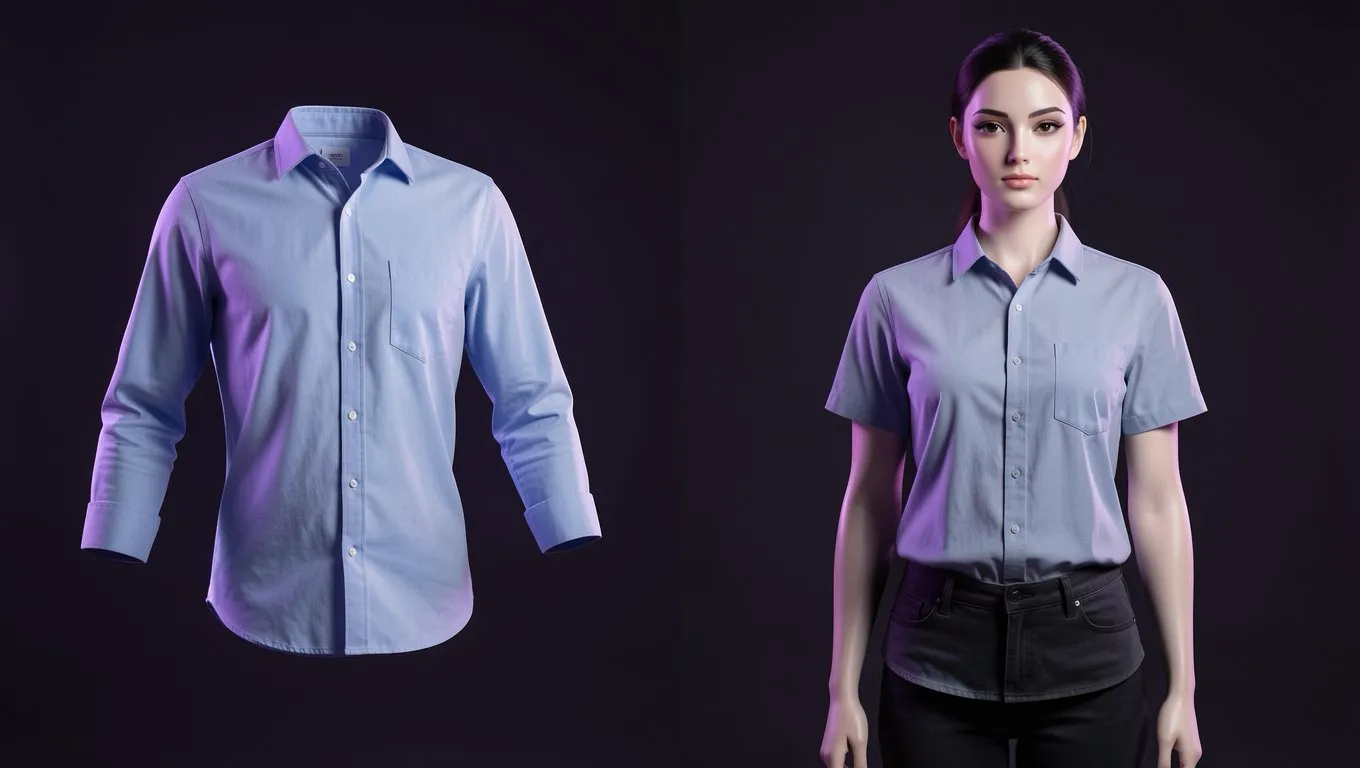
Ghost mannequin photography makes a garment look as if an invisible person is wearing it. You see the full 3D shape, the open neckline and the inside back label, but no mannequin and no model. Marketplaces and fashion brands use it because it shows shape and fit better than a flat lay and costs far less than a model shoot.
There are three ways to get the effect: shoot it in a studio and composite it in Photoshop, pay a studio or retoucher, or generate it with AI from a single photo. This guide covers all three, with the setup, the shots, the editing steps and real prices.
What is ghost mannequin photography?
Ghost mannequin photography (also called invisible mannequin or hollow man photography) is a product photo technique. The garment is shot on a mannequin, the mannequin is removed in editing, and a second photo of the inside of the garment fills the gap at the neck.
The area where the inside-back neckline is added is called the neck joint. Getting it right is what separates a convincing ghost mannequin image from a garment with a hole where the neck should be.
Ghost mannequin vs flat lay vs on-model
| Style | What the shopper sees | Best for | Effort |
|---|---|---|---|
| Flat lay | Garment laid flat, shot from above | T-shirts, knitwear, kidswear, accessories | Low |
| Ghost mannequin | 3D shape and inside neckline, no body | Shirts, jackets, dresses, structured pieces, marketplace galleries | High: 2 or more shots plus compositing |
| On-model | Fit and drape on a real body | Hero images, campaigns, DTC product pages | Highest: model, styling, retouching |
| AI ghost mannequin | Same invisible-mannequin look from one photo | Large catalogs and fast refreshes | Low: one photo, then review |
Many brands use on-model photos as the main image and ghost mannequin shots in the gallery, so shoppers see both the fit and the exact shape of the garment. For a closer look at that choice, read ghost mannequin vs AI model photography.
What you need for a studio ghost mannequin shoot
- •A ghost mannequin: a mannequin with a removable neck or chest piece and removable arms. Choose one sized to your sample size so the garment fills out without stretching.
- •Camera and tripod: a DSLR or mirrorless camera works best; a recent phone on a tripod is fine for smaller catalogs. Tethering the camera to a computer helps you check every frame.
- •Lighting: two softboxes at about 45 degrees on either side of the mannequin, or a large window with diffused daylight. The light must stay identical across every shot of the same garment.
- •Background: white seamless paper plus white foam boards to bounce light. White mannequins work best on white backgrounds.
- •Styling kit: a steamer, lint roller, pins and clips, and tissue paper.
- •Editing software: Adobe Photoshop, or a free editor such as GIMP or Photopea if you only need a few images.
Good starting camera settings: aperture f/8 to f/11 so the whole garment is sharp, ISO 100 to 200, manual white balance set from a grey card, and RAW files. Keep the same lens, focal length and camera height for every shot.
How to do ghost mannequin photography, step by step
Step 1: Prepare the garment
Steam out every crease, lint-roll the fabric and remove hang tags you don't want in the shot. Fasten buttons and zips, and check that the garment hangs evenly on both sides.
Step 2: Style it on the mannequin
Put the garment on the mannequin and adjust it until it looks like it is worn. Pin or clip any loose fabric at the back, out of the camera's view. Square the shoulders, line up the side seams and let the sleeves hang naturally. Avoid angles that let the camera see down the sleeves.
Step 3: Shoot the photos you need
Plan on three to four photos per garment:
- Front on the mannequin. Set the camera at chest height for tops and hip height for bottoms.
- Back on the mannequin, if you sell with a back view.
- Inside neck (neck joint) shot. Remove the mannequin's neck piece, or turn the garment inside out, and photograph the inside back of the neckline and label from the same position.
- Optional extras: side views, inside-out shots to fill sleeve openings, and close-ups of fabric, labels and stitching.
Mark the tripod position and the mannequin's position on the floor with tape. If the camera or light moves between shots, the composite will look pasted.
Step 4: Composite the image in Photoshop
- Open the front shot and the inside-neck shot. Drag the inside-neck shot into the front file as a layer below the front shot.
- Select the garment on the front shot with Select Subject, the Object Selection tool or the Pen tool for clean, hard edges.
- Open Select and Mask to refine soft fabric edges, then add a layer mask. Paint out the mannequin's neck, any visible mannequin parts and the background.
- Position the inside-neck layer so the back of the neckline shows through the opening. Use Free Transform and Warp to match the curve of the collar, then mask its edges so it blends.
- Add depth inside the neck: create a new layer set to Multiply and paint soft shadows with a black brush at about 15% opacity.
- Retouch: remove pins, clips, lint and stray threads with the Spot Healing Brush and Clone Stamp. Even out the shoulders and hem if needed.
- Add a pure white background layer (RGB 255, 255, 255) under everything.
- Match colours to the physical garment using your grey-card shot, then crop and export at the size your store needs.
Manual retouching takes roughly 10 minutes to an hour per garment, depending on how complex the piece is. That is why large catalogs usually outsource editing or switch to AI.
Common ghost mannequin problems and how to fix them
| Problem | Usual cause | Fix |
|---|---|---|
| Empty hole at the neck | No inside-neck shot | Shoot the neck joint photo, or generate the view with AI |
| Collapsed or uneven shoulders | Garment loose on the mannequin | Use a better-sized mannequin, pad with tissue, adjust with Warp |
| White halo around the edges | Rough mask on a white background | Refine the edge in Select and Mask and use Decontaminate Colors |
| Neckline looks pasted on | Light or camera moved between shots | Lock the camera and lights; reshoot both photos together |
| Colours look wrong | Mixed light or auto white balance | Use one light source type and a grey card |
| Pins or clips visible | Clipped where the camera can see | Clip only at the back, then retouch anything left |
How much does ghost mannequin photography cost?
Prices checked October 9, 2026:
| Option | Price | Turnaround |
|---|---|---|
| Full-service studio (Squareshot) | From $75 per image ($52.50 with membership) | 6 to 8 business days |
| Ghost mannequin styling (soona) | From $129 per hour | Not stated |
| Editing-only service (Pixelz) | Per image, see its pricing page | Same day |
| AI with ApparelAI | 2 credits per front view, 1 per extra view: about $0.27 to $0.34 for a front view, depending on plan | About 30 seconds |
The AI figure comes from the ApparelAI plans that include ghost mannequin shots: Growth $34 for 200 credits, Business $79 for 500 and Agency $199 for 1,500 ($0.13 to $0.17 per credit).
How to create ghost mannequin photos without Photoshop
You can skip the mannequin, the second shot and the compositing by generating the effect with AI. ApparelAI's AI ghost mannequin generator works from one photo of the garment.
- Take one clean photo. A hanger shot, flat lay, mannequin photo or on-model photo all work. Steam the garment, shoot square-on with the whole piece in frame, fasten buttons and use even, diffused light. Our flat lay clothing photography guide covers the setup.
- Upload it and choose your views. The front view comes first; add back and side views if you need them. For an accurate back view, upload a real photo of the back.
- Generate (about 30 seconds) and review at full size. Check the neckline and label area, print alignment, logos and colour against the real garment.
- Download the images sized for your store or marketplace.
Every option, including back and side views, is covered in the ghost mannequin guide in the ApparelAI docs.
AI is weakest on sheer fabrics, very fine prints and text on labels. Always compare the result with the physical garment before you publish it.
Which method should you choose?
- •Studio: premium brands that need exact fabric detail on hero images and can wait about a week.
- •DIY with Photoshop: small catalogs where you have the time and editing skills.
- •AI: catalogs of 50 or more SKUs, frequent new arrivals, marketplace galleries and colour variants.
If you would rather not run shoots at all, see ghost mannequin product photography without a studio.
Image requirements for stores and marketplaces
- •Shopify: square images of 2048 x 2048 px usually display best; files can be up to 5000 x 5000 px (25 megapixels) and must be under 20 MB (Shopify help).
- •Amazon: main images need a pure white background, and no visible mannequin. Images at least 1,000 px on the longest side enable zoom. Rules differ by clothing category, so check your category's style guide before uploading.
Ghost mannequin shots for ethnic wear
For Indian ethnic wear, two shots work well alongside on-model photos: a Blouse Flat Lay (the blouse alone on white) and Blouse Front and Back (both views on an invisible mannequin, stacked in one image). Sarees and suit sets should be photographed piece by piece so each part is shown accurately.
Try it on your own garment: upload one photo to the AI ghost mannequin generator and get your first ghost mannequin shot in about 30 seconds.
Frequently Asked Questions
What is a ghost mannequin?
A mannequin with removable parts that is edited out of the photo, leaving the garment in a 3D worn shape. The finished image is often called a ghost or invisible mannequin photo.
How many photos do you need for the ghost mannequin effect?
At least two: the front on the mannequin and the inside back of the neckline. Three to four per garment is typical once you add a back view and detail shots.
Can you do ghost mannequin photography without a mannequin?
Yes. You can shoot the garment on a model and remove the model in editing, which takes more retouching, or generate the effect with AI from a flat lay or hanger photo.
How much does ghost mannequin photography cost?
Studios charge from about $75 per image. Editing-only services charge per image. AI tools such as ApparelAI cost well under $1 per image.
Is there a free ghost mannequin app?
Free editors such as GIMP and Photopea can do it manually. ApparelAI's free plan includes 3 credits, enough to test the AI generator on one garment.
Can I use ghost mannequin photos on Amazon?
Generally yes, as long as no part of the mannequin is visible and the main image is on pure white. Check your category's image rules first.
Ready to try AI product photography?
Start with 3 free images. No credit card required.
Start Free Photoshoot