Clothing Product Photography: Studio, DIY or AI?
Clothing product photography compared: what a studio costs, how to shoot it yourself, and when AI model photos make sense. Real prices and setups.
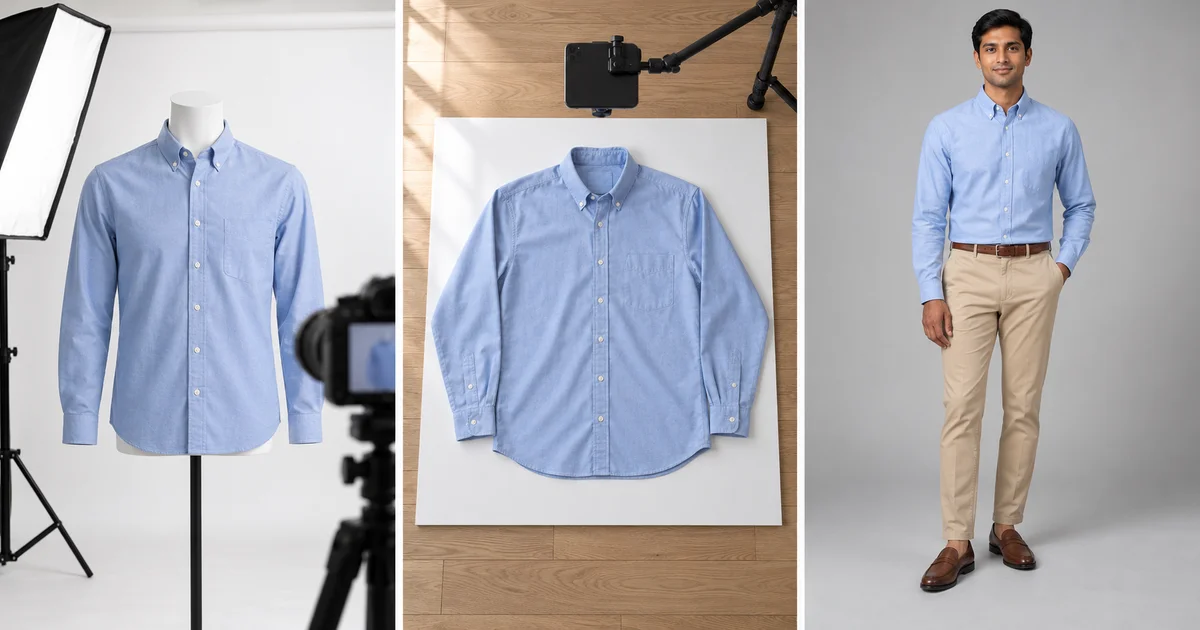
Good product photos sell clothes. They are also one of the biggest costs of running a fashion brand. You have three ways to get them: hire a studio, shoot them yourself, or generate on-model photos with AI. Each one suits a different stage of business.
This guide compares the three on cost, speed and quality, then walks through each one.
Studio vs DIY vs AI at a glance
| Hire a studio | Shoot it yourself | AI model photos | |
|---|---|---|---|
| Cost per image | $39 to $95+ | Your time, plus a one-off kit | $0.13 to $0.47 |
| Turnaround | About 1 to 2 weeks | Same day | Seconds per image |
| On-model photos | Yes, model fees extra | Only with a model you book | Yes |
| Best for | Campaigns, hero images, premium brands | Small catalogs, resellers, flat lays | Large catalogs, variants, marketplaces |
| Watch out for | Minimums, shipping samples | Inconsistent results | Checking every image for accuracy |
Studio prices: soona from $39 per photo; Squareshot from $50 per product image and from $95 per model image. AI price: ApparelAI plans, 1 to 3 credits per image at $0.13 to $0.18 per credit. All prices checked October 9, 2026.
The types of clothing product photos
| Type | What it shows | Where it is used |
|---|---|---|
| Flat lay | Garment laid flat, shot from above | Marketplace galleries, social, basics and kidswear |
| Ghost mannequin | 3D shape with an invisible body | Marketplace main and gallery images |
| Hanging or pinned | Garment on a hanger or pinned to a wall | Flowing fabrics, resale listings |
| On-model | Fit and drape on a real or AI model | Main product image, ads |
| Lifestyle | The garment worn in a real setting | Ads, social, homepage banners |
| Detail | Fabric, stitching, labels, trims | Product page gallery |
The shot list every product needs
- Front, on a white or light grey background
- Back
- Side or three-quarter view, for fitted styles
- On-model, to show fit
- Fabric and detail close-ups: texture, stitching, buttons, labels
- Every colour you sell
- Optional: a lifestyle shot or a short video
Option 1: Hire a clothing photography studio
A studio handles lighting, styling, retouching and, for on-model shoots, the model.
How it works
- Send a brief: products, shot types, number of images, references.
- Ship your samples. Studios usually ask for clean, undamaged items.
- The studio shoots and retouches.
- You approve the images or request revisions, then get your samples back.
What it costs
- •soona: from $39 per photo, a la carte. Model fees are quoted separately.
- •Squareshot: from $50 per product image or $750 for a 2-hour shoot; model shoots from $95 per image or $2,950 for a 4-hour shoot. Standard delivery takes 6 to 8 business days after samples and payment arrive.
Questions to ask any studio
- •Is retouching included, and how many revisions?
- •What usage license do you get, and does it cover ads?
- •Are model fees, styling and backdrops extra?
- •Is there a minimum order?
- •How long until delivery, and what does rush cost?
Option 2: Shoot clothing photos yourself
Shooting in-house costs your time plus a one-off kit, and gives you full control.
Basic setup
- •Light: a large window with a sheer curtain, or two softboxes at about 45 degrees on either side.
- •Background: white or light grey seamless paper or foam board.
- •Camera: a recent phone or a DSLR or mirrorless camera on a tripod.
- •Styling kit: steamer, lint roller, pins and clips, tissue paper.
- •Display: a flat surface for flat lays, a mannequin for 3D shape, or a model.
Camera settings
- •Aperture f/8 for a sharp garment from edge to edge.
- •ISO 100 to 200.
- •Custom white balance set from a grey card or white paper.
- •RAW files on a camera; the highest resolution on a phone.
- •Same camera position, height and lens for every product.
For flat lays step by step, read our flat lay clothing photography guide. For mannequin shots, read our ghost mannequin photography guide.
How to take pictures of clothes to sell online
If you resell on marketplaces such as Poshmark, Depop, Etsy or eBay, a phone is enough:
- Shoot near a window in daylight, with no flash.
- Use a plain wall or a white sheet as the background.
- Steam the item and remove lint.
- Hang it on a plain hanger against the wall, or lay it flat and shoot from directly above.
- Take the front, back, the label and any flaws. Honest flaw photos prevent returns.
- Add a photo with a measuring tape across the chest or waist.
- Keep every photo of the item in the same light so the colour stays consistent.
Option 3: AI model photos
AI tools put your garment on a realistic model from a single photo, so you can show fit without booking a shoot.
How it works
- Take one clean photo: flat lay, hanger, mannequin or phone photo.
- Upload it and choose a model and a scene.
- Generate the image in seconds, review it and download it.
With ApparelAI, an image costs 1 credit at 1K, 2 at 2K and 3 at 4K resolution. Plans run from $9 for 50 credits to $199 for 1,500 credits, so an image costs $0.13 to $0.47 (4K is on the Business and Agency plans). You can keep one persistent brand model across the whole catalog, shoot up to 50 garments in a batch (Business plan and above), and turn photos into short videos (Growth plan and above).
Where AI fits, and where it doesn't
- •Good fit: large catalogs, frequent drops, colour variants, marketplace galleries, ad tests, size-inclusive ranges.
- •Weaker fit: sheer and very fine fabrics, garments where exact texture is the selling point, high-end campaign imagery.
- •Always check: colour, print, logos and proportions against the real garment before publishing. Some marketplaces have rules about AI-generated images, so check yours.
Which option should you choose?
| Your situation | Best option |
|---|---|
| New brand, under 20 products | DIY flat lays, plus AI for on-model shots |
| 100+ products or weekly new arrivals | AI for the catalog, a studio for hero campaign images |
| Premium or luxury brand | Studio for main images, AI for variants and ads |
| Marketplace reseller | DIY phone photos |
| Size-inclusive range | AI to show every style on several body types |
| Indian ethnic wear (sarees, suits) | AI from separate photos of each piece |
Image sizes by channel
| Channel | Recommended size |
|---|---|
| Shopify | 2048 x 2048 px for square images; up to 5000 x 5000 px and 20 MB (Shopify help) |
| Amazon | At least 1,000 px on the longest side for zoom; pure white background for the main image |
| Instagram feed | 1080 x 1350 px (4:5 portrait) |
| Reels, Stories and TikTok | 1080 x 1920 px (9:16) |
Mistakes that cost sales
- •Colours that don't match the real product. This leads to returns. Set white balance from a grey card.
- •Inconsistent backgrounds and angles across the catalog. They make a store look untrustworthy.
- •No fit reference. Without an on-model shot or measurements, shoppers guess their size.
- •Missing back and detail shots. Shoppers want to see the back, the fabric and the label.
- •Over-editing. Smoothing away fabric texture makes a garment look cheaper.
See your product on a model: try the AI fashion model generator free with 3 credits.
Frequently Asked Questions
How much does clothing product photography cost?
Studios charge from about $39 to $95 or more per image, with model fees extra. Shooting yourself costs your time and a one-off kit. AI model photos cost well under $1 per image.
What is the best background for clothing photos?
Pure white for marketplaces, and white or light grey for your own store. Use light grey for white garments so the edges stay visible.
Do I need a model for clothing photos?
Not always. Flat lays and ghost mannequin shots work for most products, but on-model photos show fit best. AI can create on-model photos from a flat lay.
Can I take professional clothing photos with a phone?
Yes. Use soft window light, a plain background, a fixed position, and lock exposure on a white sheet of paper.
What is fashion product photography?
Photos of clothing and accessories made to sell them online or in ads: flat lays, ghost mannequin, on-model, lifestyle and detail shots.
Ready to try AI product photography?
Start with 3 free images. No credit card required.
Start Free Photoshoot