Dress and Activewear AI Photography Guide
Dresses need to show drape and movement. Activewear needs to show stretch and performance. Here is how AI handles both, and tips for getting the best results.
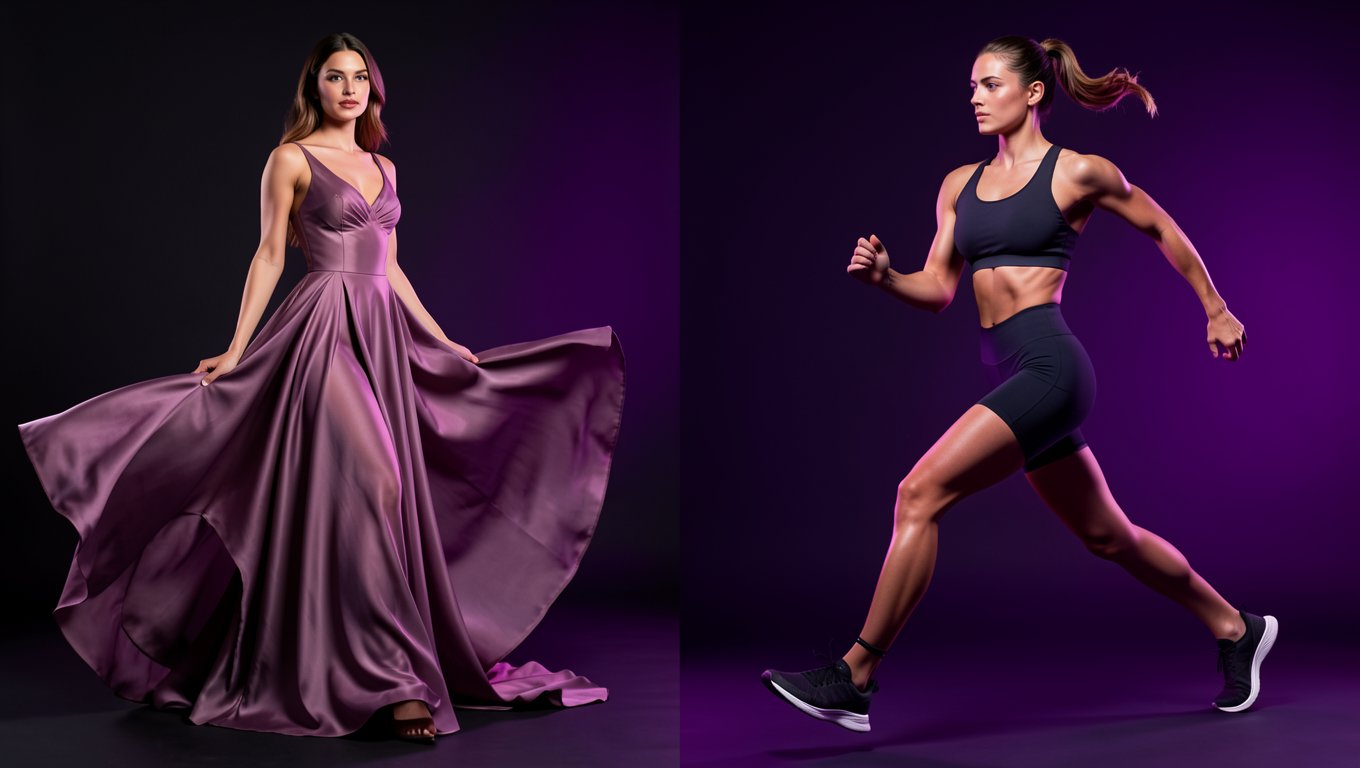
Dresses and activewear sit at opposite ends of the fashion spectrum. Dresses are about elegance, drape, and silhouette. Activewear is about performance, stretch, and movement. Both sell better with on-model photography, and both work well with AI. But the approach for each is completely different.
Dresses: showing fabric and flow
The biggest challenge with dress photography is fabric. A satin cocktail dress behaves nothing like a cotton sundress, and buyers need to understand the fabric before purchasing. Returns spike when a dress looks "stiff" in photos but flows in person, or vice versa.
What matters for dress photography:
Silhouette is everything. Buyers want to see the shape: A-line, bodycon, wrap, shift, maxi. Your AI-generated model shot must clearly show the dress silhouette. Choose poses that don't hide the garment's shape.
Fabric movement. The best dress photos show slight movement. A gentle turn, a walking pose, even just the way the hemline falls naturally. Static, stiff poses make dresses look like costumes.
Color accuracy cannot be wrong. Dress returns are disproportionately driven by "color looks different in person." If your AI tool shifts a "dusty rose" to "pink" or a "navy" to "black," you'll pay for it. Always verify color accuracy against your physical product.
Length relative to body. Buyers need to understand where the hemline falls: above knee, at knee, midi, ankle, floor-length. This means your AI model's height and proportions matter. A maxi dress on a 5'10" model looks midi on a 5'3" buyer.
Tips for different dress fabrics:
- •Cotton/linen: AI handles these well. Clean, predictable drape
- •Satin/silk: Challenging. The sheen and flow are hard to simulate. Photograph on a mannequin (not flat) to give AI a better starting reference
- •Chiffon/sheer: Most challenging for AI. Consider using ghost mannequin photos as input rather than flat lays
- •Jersey/knit: Works well with AI. The stretch and body-hugging behavior translates cleanly
Activewear: showing performance and fit
Activewear photography is fundamentally different. You're not selling elegance. You're selling performance, comfort, and aspiration. The buyer isn't picturing themselves at a dinner party. They're picturing themselves running, lifting, or doing yoga.
What matters for activewear photography:
Dynamic poses are essential. A sports bra photographed on a model standing still looks like any other crop top. The same sports bra on a model in a running pose instantly communicates its purpose. AI tools with dynamic pose libraries are worth paying for in this category.
Compression fit must look flattering. Leggings and sports bras need to look supportive, not just tight. The AI model's body type should match your target customer. A compression fit that looks overly tight or uncomfortable in the image will hurt conversion.
Show the stretch. The most persuasive activewear photos demonstrate elasticity. A model mid-lunge in leggings shows the fabric stretching naturally. This is harder for AI than static poses, but the best tools handle it well.
Lifestyle context matters more here. A dress on a white background works fine. Activewear on a white background looks clinical and uninspiring. Gym backgrounds, outdoor running trails, yoga studios, and park settings all help sell the lifestyle.
Tips for activewear subcategories:
- •Leggings: Show from multiple angles. Side view is critical for showing waistband height and leg silhouette. Running or yoga poses showcase stretch
- •Sports bras: Front and back views essential. Show strap design clearly. Medium-support vs. high-support should be visually apparent
- •Shorts: Movement poses work best. Cycling, running, or squatting positions show fit and coverage
- •Hoodies/track jackets: Both zipped and unzipped views. Show hood styling. Pair with complementary bottom (creates a complete look)
To turn your own flat lays into AI sportswear model photos, upload the leggings, sports bra or set, then pick an athletic pose and a gym, court, track or outdoor scene.
How to get the best AI results for both
For dresses:
- Photograph on a mannequin rather than flat lay (shows existing drape)
- Use soft, even lighting to show fabric texture
- Generate model shots in poses that show the silhouette
- Choose backgrounds that complement the dress style (white for marketplace, lifestyle for brand site)
- Always generate front, back, and side views
For activewear:
- Flat lay works fine as input (simpler garment shapes)
- Choose dynamic, athletic poses (not static standing)
- Use lifestyle backgrounds (gym, outdoor, yoga studio)
- Generate the same garment on different body types to show inclusive fit
- Supplement with fabric detail shots showing texture and stretch
The business case
For a fashion brand selling both categories:
Traditional photography cost:
- •Dresses (50 styles): Rs 3,00,000-5,00,000 / $15,000-25,000
- •Activewear (50 styles): Rs 2,50,000-4,00,000 / $12,000-20,000
AI photography cost:
- •Both categories (100 styles): Under Rs 10,000 / Under $500
The quality gap has narrowed to the point where most shoppers can't distinguish AI-generated activewear and dress photos from traditional ones. The brands that invest the savings into better products, faster launches, or lower prices gain a real competitive advantage.
Bottom line
Dresses and activewear both benefit massively from AI photography, but the approach is different. Dresses need mannequin input photos, elegant poses, and attention to fabric drape. Activewear needs flat lay inputs, dynamic poses, and lifestyle backgrounds. Get the approach right for each category, and your listings will perform as well as brands spending ten times more on traditional photography.
Ready to try AI product photography?
Start with 3 free images. No credit card required.
Start Free Photoshoot