Skip to content
AI Background Remover for Fashion

AI Background Remover Built for Fashion Photos

One-click background removal that returns a clean transparent PNG. Tuned for fashion edge-cases like flyaway hair, lace, fringe, sheer chiffon, fur, and embroidery cutouts that generic background removers fail on.

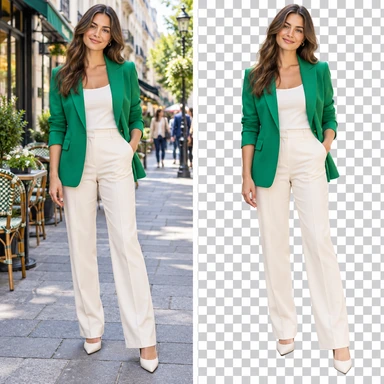
AI Background Remover before-and-after - blue silk gown stripped of red damask backdrop into a transparent PNG ready for any layout

What it does

Strip the background from any garment or model photo and get a transparent PNG in seconds. Unlike generic background removers that struggle with hair, lace, sheer fabrics, fringe, fur and complex outlines, the ApparelAI background remover is trained specifically on fashion imagery - so edge cases that trip up Remove.bg and Photoshop's Subject Select work cleanly here. Drop the output into any layout, listing, banner, ad creative or composite.

How it works

01

Upload your photo

Drop in any garment, hanger, or on-model shot. JPG or PNG, any aspect ratio.

02

AI strips the background

The fashion-tuned model handles hair, lace, sheer fabrics and embroidery cutouts that generic tools miss.

03

Download transparent PNG

Get a clean, edge-perfect PNG ready to drop into any layout, banner, ad, or composite workflow.

Best for

  • Quick listing prep where you need a clean transparent PNG
  • Compositing model photos onto custom or branded backdrops
  • Replacing a manual Photoshop background-removal step

AI Background Remover for fashion vs. generic tools

AspectApparelAIRemove.bg and generic tools
Trained onFashion imagery specificallyGeneral objects
Flyaway hairClean alpha edgesCardboard-cutout look
Sheer chiffon and lacePreserves transparencyOften goes opaque
Fringe and embroidery cutoutsEdge-perfectJagged edges
Built for fashion ecommerceYesNo - generic use cases

Frequently asked questions

How is this AI background remover different from Remove.bg or Canva?

Generic background removers are trained on general images - people, pets, products of all kinds. ApparelAI is trained specifically on fashion imagery, which means it handles flyaway hair, sheer chiffon, lace, fringe, fur and embroidery cutouts cleanly - the exact cases generic tools fail on.

Can the AI background remover handle hair and sheer fabrics?

Yes. Hair, lace, sheer fabric, fringe, and intricate edges (cutouts, embroidery, fringe trim) are the cases the model is specifically trained for. You get clean alpha edges instead of the cardboard-cutout look generic tools produce.

What output formats are supported?

Output is a transparent PNG at the same resolution as your upload. You can then re-export to JPG with a custom backdrop using the Background Changer if needed.

Which plans include the background remover?

The AI Background Remover is included on the Growth plan and above (Growth, Business and Agency). Each use costs 1 credit from your monthly allowance, and the free plan gives you 3 credits a month to test it - no credit card required.

Can I process multiple photos at once?

Yes. Use Catalog generation (available on the Business plan and above) to process up to 100 photos in a single operation - useful for catalog launches.

Try AI Background Remover today.

Start with 3 free credits. No credit card required. Generate your first result in seconds.

Start free - 3 credits, no card