AI Background Changer for Product & Fashion Photos
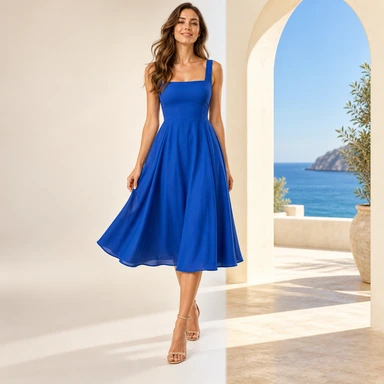
Replace the background on any product or model photo. Describe the new scene in words ("Mediterranean villa balcony, golden hour") or upload a reference photo. Lighting and shadows automatically adapt so the composite looks real.
What it does
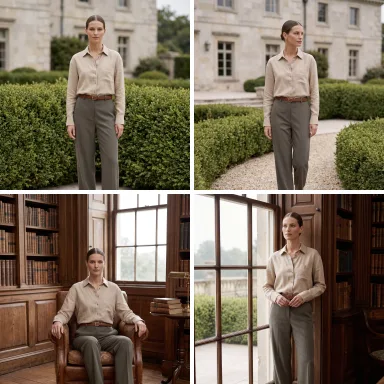
Replace the backdrop on any garment or model photo without re-shooting. Two modes are supported. Text mode: describe the scene you want ('Tokyo neon street, blue hour' or 'sun-drenched cream studio') and the AI generates that backdrop in context. Reference mode: upload a specific backdrop photo and the model is composited into it with matched lighting, color temperature and shadow direction. Either way you get a finished, brand-aligned scene without booking a new photoshoot.
How it works
Upload your source photo
Any product or model photo. The current background gets cleanly removed.
Describe or upload the new scene
Either type a scene description ("Italian villa terrace, golden hour") or upload a reference backdrop image.
Get a matched-lighting composite
The AI places the subject into the new scene with auto-matched lighting direction, shadows, and color temperature.
Step-by-step guide in the ApparelAI docs: How to change the background of a product photo (opens in a new tab)
Best for
- Catalog seasonality swaps (summer / winter / festive themes)
- A/B testing different lifestyle scenes for the same product
- Matching brand-specific backdrops without a fresh shoot
Frequently asked questions
How does the text-description mode work?
Type a scene description like "Mediterranean villa balcony at golden hour" or "minimalist Tokyo studio with grey backdrop" and the AI generates that exact backdrop, then composites your subject into it with appropriate lighting.
Can I upload a specific backdrop image?
Yes. Reference mode lets you upload any background photo - your brand photoshoot location, a stock backdrop, anything - and the AI places your model into it. Lighting auto-matches so the result reads as a single photo.
Does the lighting actually match, or does it look pasted-on?
The AI analyzes the new backdrop's lighting direction, color temperature and shadow softness, then re-lights the foreground subject to match. Hard edges and shadow inconsistencies (the dead giveaways of bad compositing) are handled automatically.
Can I reuse the same backdrop across my catalog?
Yes. Re-upload the same reference photo, or re-use the same text description, whenever you need that backdrop again - the automatic lighting match keeps results consistent across your whole catalog.
What if I just want a transparent background instead?
Use the Background Remover tool instead - that returns a transparent PNG. Background Changer is for swapping to a new scene.
More AI tools for fashion brands

Try AI Background Changer today.
Start with 3 free credits. No credit card required.
Start free - 3 credits, no card