Introduction
Botika has been around long enough to become a reference point in AI fashion photography. With over 3,000 brands served and a well-documented Shopify integration, it was one of the first platforms to prove that flat-lay to model AI generation could work at e-commerce scale.
However, fashion brands, D2C apparel founders, and marketplace sellers are actively looking for a more cost-effective, high-speed Botika alternative. The AI image generation landscape has advanced rapidly. Newer platforms like ApparelAI have eliminated visible AI artifacts, reduced turnaround times from minutes to seconds, and introduced dedicated e-commerce workflows like custom persistent brand models, ghost mannequin generation, and marketplace dimensions.
This comparison breaks down where each platform excels in 2026, comparing output quality, credit economics, speed, and overall feature completeness based on hands-on tests with identical garment inputs.
Why People Look for a Botika Alternative
- Cost per photo: Botika's Pro plan costs $46 a month, billed yearly, for 600 credits a year, about $0.92 a photo. ApparelAI starts at $9 a month for 50 credits, about $0.18 an image.
- More than model photos: brands that also need ghost mannequin shots and color variants can make them in the same tool.
- Garment range: sellers of Indian ethnic wear need sarees and suit sets handled piece by piece.
- Trying before paying: ApparelAI's free plan needs no credit card.
Feature Comparison
| Feature | ApparelAI | Botika |
|---|---|---|
| Primary Use Case | Full AI fashion photoshoot studio and catalogue automation | Flat-lay to AI model image replacement |
| Starting Price | Free (3 credits/mo) or USD 9/mo (50 credits) | USD 46/mo billed yearly (600 credits a year) |
| Price Per Image (Entry Plan) | USD 0.18 | About USD 0.92 |
| Best Botika Alternative For | High-volume catalogues, Indian ethnic wear, 4K marketplace exports | Low-volume western wear with credit rollover |
| Persistent Model System | Yes, unlimited reuse of custom brand models | Limited model consistency across separate sessions |
| Output Resolution | Up to 4K (Business and Agency plans) | 2K on Pro, 4K on Advanced |
| Output Realism | Photorealistic studio-grade skin, drape, and texture | Visible AI smoothing on fine patterns and embroidery |
| Ease of Use | 5-step guided photoshoot wizard | Moderate learning curve |
| Marketplace Presets | Myntra, Amazon, Flipkart, Ajio, Meesho, Nykaa | Generic aspect ratios only |
| Batch Generation | Up to 50 garments per batch (Business plan and above) | Bulk processing available on select plans |
| Generation Speed | 8 to 12 seconds per image | 10 to 15 minutes per batch reported |
| Custom Pose Extraction | Yes, extract poses from any reference photo (Business plan and above) | Fixed pre-set pose library |
| Custom Backgrounds | Text prompts plus reference photo lighting extraction (reference photos on the Business plan and above) | Basic background swaps |
| Ghost Mannequin Tool | Yes, standalone tool included (Growth plan and above) | Not available |
| Sketch to Garment Tool | Yes, standalone tool included (Growth plan and above) | Not available |
| Color Variation Tool | Yes, generate multiple colorways instantly (Growth plan and above) | Not available |
| Outfit Builder | Yes, combine tops, bottoms, and accessories (Growth plan and above) | Not available |
| Shopify Integration | Yes, direct store sync | Yes, Shopify App store plugin |
| WooCommerce Integration | Yes | Not available |
| Model Diversity | 60+ models across ethnicities, ages, and body shapes | Moderate library, limited ethnic variation |
| Video Generation | Yes (Growth plan and above) | Yes (costs 5 credits per video) |
| Credit Rollover | Monthly reset | Unused credits rollover while subscription is active |
| Retouching by a Person | Not offered (AI refinement on Business and above) | 2 retouch rounds per photo on Pro, 3 on Advanced |
ApparelAI Workflow Walkthrough
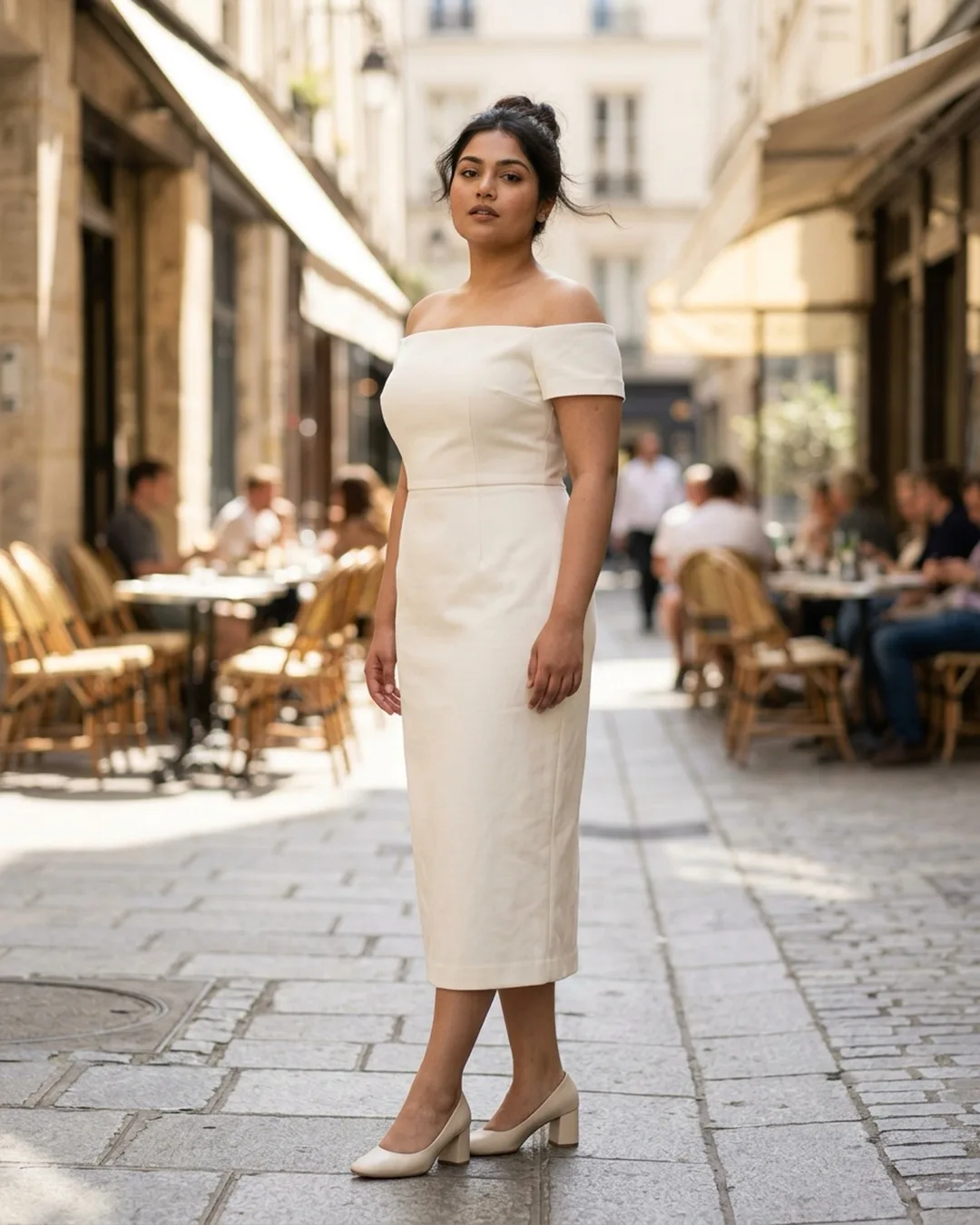
Testing ApparelAI with a cream off-shoulder midi dress took under four minutes from raw image upload to finished, marketplace-ready downloads.
The 5-step creation wizard allowed us to upload both front and back garment photos. Next, the model selector provided over 60 diverse virtual models spanning South Asian, East Asian, Caucasian, and African ethnicities across multiple body builds and age brackets. We selected a medium-build Indian female model, applied the Myntra preset (1080x1440 portrait), and chose a minimalist studio background.
The live composition canvas previewed the garment placement and estimated credit cost before generating. The final 4K image was delivered in just 8 seconds. The fabric texture, collar folds, and embroidery remained crisp without artificial distortion. We also tested an outdoor beach background extracted directly from a reference photo, and the lighting adjusted realistically on the model skin and garment. Total time spent for two production-ready variants: under 6 minutes.
Botika Workflow (First-Hand Test)
Botika operates on a similar concept but requires extra navigation between steps. Uploading the same dress required a separate background cutout step before reaching the model selection menu.
The model catalogue offers decent standard options, but ethnic and body-type variety is more limited. Once submitted, processing our 3-image batch took approximately 12 minutes on the standard plan. The resulting output was acceptable for simple western cuts, but close inspection revealed that fine embroidery on the neckline was noticeably smoothed over. This smoothing often occurs when standard background removal filters mistake detailed surface threadwork for background noise. Botika does offer credit rollover on active subscriptions, which is practical for sellers who have irregular monthly photography needs.
Garment Type Suitability
| Garment Category | ApparelAI Performance | Botika Performance |
|---|---|---|
| Western dresses and tops | Excellent, sharp fabric texture and seam lines | Good, reliable for standard, clean-cut garments |
| Ethnic kurtas and anarkalis | Excellent, threadwork and collar embroidery retained | Fair, fine embroidery details frequently softened |
| Sarees and lehengas | Good, multi-panel drape and zari borders preserved | Limited, struggles with complex multi-fold drape |
| Knitwear and textured outerwear | Excellent, yarn weave and structured silhouette preserved | Good, handles structured jackets well |
| Coordinated sets and accessories | Excellent, Outfit Builder styles multiple pieces together | Not supported natively |
Pricing and Cost-Per-Image Breakdown: Is ApparelAI Cheaper Than Botika?
Prices checked on October 9, 2026. Sources: Botika pricing and ApparelAI pricing.
| Pricing | ApparelAI | Botika |
|---|---|---|
| Free option | Free plan: 3 credits, no credit card | Free trial (credit amount not stated) |
| Entry plan | Pro: $9/month for 50 credits | Pro: $46/month billed yearly, 600 credits a year |
| Next plan | Growth: $34/month for 200 credits | Advanced: $100/month billed yearly, 1,200 credits a year |
| Cost per photo | $0.13 to $0.18 | About $0.92 to $1.00 |
| 4K output | Business ($79) and Agency ($199) plans | Advanced plan and above |
| Video | Growth plan and above | Included; 5 credits per video |
| Unused credits | Reset each month | Roll over while subscribed |
| Retouching by a person | Not offered | 2 rounds per photo on Pro, 3 on Advanced |
For 200 product photos a month, ApparelAI's Growth plan costs $34. The same 200 photos use about $184 to $200 worth of Botika credits at its yearly plan rates, roughly five times as much.
Botika's unused credits roll over while you stay subscribed, which helps if you shoot in bursts, and its plans include retouch rounds by Botika's team. ApparelAI's free plan gives you 3 credits with no credit card, so you can judge output on your own garments before paying.
Where ApparelAI Wins
- About 5x Lower Cost Per Image: At USD 0.18 per image on the Pro plan versus about USD 0.92 on Botika's yearly Pro plan, ApparelAI saves thousands of dollars annually for scaling apparel brands.
- Instant Generation (Seconds vs Minutes): Produces high-resolution on-model renders in 8 to 12 seconds instead of waiting 10 to 15 minutes per batch queue.
- True Persistent Brand Models: Create and save custom virtual models (specifying gender, age, ethnicity, and body type) to keep a unified model face and physique across your entire brand catalogue.
- Superior Texture and Drape Fidelity: Advanced garment preservation algorithms maintain fine embroidery, prints, fabric grain, and logos without blur or AI smoothing.
- One-Click Marketplace Dimensions: Built-in export presets for Myntra, Amazon, Flipkart, Ajio, Meesho, and Nykaa Fashion automatically format image ratios and canvas resolutions.
- Full In-House Creative Suite: Includes standalone tools like Ghost Mannequin creation, Color Variation generators, Sketch to Garment, and Outfit Builders that Botika lacks (Growth plan and above).
- Dual-Angle Shoot Support: Upload front and back garment shots together so models can turn and showcase complete multi-angle apparel views.
Where Botika Wins
- Credit Rollover Feature: If you run an irregular production schedule where you produce images every few months, unused credits carry over as long as your paid plan remains active.
- Retouching by Botika's Team: Pro includes 2 retouch rounds per photo and Advanced includes 3. You flag what needs fixing and Botika's team retouches the image within one to two days.
- Established Brand Footprint: Botika has served thousands of merchants and possesses a long-standing presence in the Shopify App Store.
- Familiarity for Basic Western Wear: For simple, single-color western shirts and tops, Botika provides a proven and straightforward workflow.
Who Should Switch to ApparelAI?
- Brands that produce more than 30 SKUs a month and want to lower their per-image production budget.
- Indian fashion labels and ethnic wear retailers selling sarees, kurtas, or lehengas that require authentic drape and embroidery handling.
- Sellers on marketplaces like Myntra, Flipkart, Amazon, and Meesho who need one-click compliant export dimensions.
- Creative teams that want additional tools like ghost mannequin conversions, multiple colorway generation, and sketch-to-photo workflows in a single subscription.
How to Switch From Botika to ApparelAI
- Download your original product photos. Use your garment photos, not Botika's outputs.
- Create a free ApparelAI account and upload your five best-selling products.
- Create a persistent brand model so the new images match across your catalog.
- Run a bulk photoshoot for the rest of the catalog, up to 50 garments per batch (Business plan and above).
Who Should Stay
- Sellers who shoot irregularly and want unused credits to roll over while they stay subscribed.
- Brands that want a person to retouch generated photos as part of their plan.
- Stores with an already established, automated Botika Shopify workflow that have no requirement for ethnic wear, ghost mannequin shots, or custom pose controls.
The Verdict
Both Botika and ApparelAI solve the same core problem of replacing expensive physical photoshoots with virtual AI fashion models.
However, in 2026, ApparelAI stands out as the superior overall Botika alternative. It costs a fraction as much per image (about USD 0.18 vs USD 0.92 on each entry plan), runs in seconds rather than minutes, offers 4K output on its Business and Agency plans, and provides a broader e-commerce toolkit that includes persistent custom models, marketplace-sized exports, ghost mannequin creation, and color variations. For modern fashion brands scaling their digital catalogue, ApparelAI provides the faster, more flexible, and more economical platform.
FAQs
Is there a free Botika alternative?
Yes. ApparelAI's free plan includes 3 credits with no credit card, enough to test on-model photos on your own products. Paid plans start at $9 a month for 50 credits.
Is ApparelAI a good Botika alternative?
For most clothing brands, yes: it costs less per image and adds ethnic wear support, plus ghost mannequin and color variation tools on the Growth plan and above. Botika may suit you better if you want unused credits to roll over month to month, or want its team to retouch your photos.
What is the best Botika alternative for AI fashion photography?
ApparelAI is widely considered the best Botika alternative in 2026 because it generates on-model fashion photography in seconds, offers persistent custom models, includes Indian marketplace presets, and costs USD 0.18 per image compared to about USD 0.92 on Botika's Pro plan.
Can I turn flat-lay photos into on-model photos with these tools?
Yes. Both platforms convert flat-lay, hanger, or mannequin clothing photos into on-model fashion photography. ApparelAI goes further by accepting dual front and back uploads, allowing you to generate multi-angle shoots showing both the front and back of the garment.
Is Botika more expensive than ApparelAI?
Yes, per image. Botika's Pro plan costs USD 46 a month billed yearly for 600 credits a year, about USD 0.92 per photo. ApparelAI starts at USD 9 a month for 50 credits (USD 0.18 per image), about five times cheaper per photo.
Does Botika support Indian e-commerce marketplace presets like Myntra or Ajio?
No. Botika provides generic dimensions only. ApparelAI features pre-configured one-click export presets for Myntra, Amazon, Flipkart, Ajio, Meesho, and Nykaa Fashion, ensuring instant compliance with marketplace listing guidelines.
How does ApparelAI handle ethnic wear compared to Botika?
ApparelAI is trained to preserve intricate garment textures such as zari borders, threadwork embroidery, and complex fabric drape on sarees, kurtas, and lehengas. Botika is primarily tailored for western apparel and often blurs or smooths out complex surface embroidery.